
Do you want to change Yahoo! Messenger title bar to be like this?
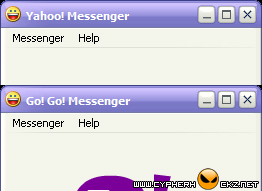
If the answer is YES, please continue reading...
In your Yahoo! Messenger installation folder (eg: C:\Program Files\Yahoo!\Messenger), look up for a filename with 'ymsgr.ini'. Open it with your favourite text editor like EditPlus 2 and add this code at the end of the file.
[APP TITLE]
CAPTION=put your text here
Put any text that you want to display at the CAPTION and click Save.CAPTION=put your text here
Now, reopen your Yahoo! Messenger and you will see the title bar is now changed to the text you have typed earlier.
Regards
nawazencyclopedia.blogspot.com

No comments:
Post a Comment